Crestron’s 80 Series Touchscreen is the Key to Stress-Free Scheduling
Ditch the Paper Calendar and Streamline the Room Booking Process
We’ve all experienced the meeting room shuffle. You’ve booked a space for a high-stakes presentation, but when you arrive, a group is already inside. Or, perhaps you’ve walked past five booked rooms that have been sitting empty for twenty minutes. For leaders in growing organizations, these are symptoms of an unoptimized facility that is actively costing you time and money.
At M3 Technology Group, we know that having smart employees inside the meeting room isn’t enough. You have to be smart outside the room, too.
The Crestron 80 Series touch screens transform your hallways from a source of confusion into a streamlined wayfinding system. Keep reading to discover how advanced scheduling intelligence helps your employees stay productive.
MORE FOR MEETINGS: Scalable Conference Room AV Matters, So Start With a Good Foundation
1. Instant Visibility Ends the Hallway Wandering
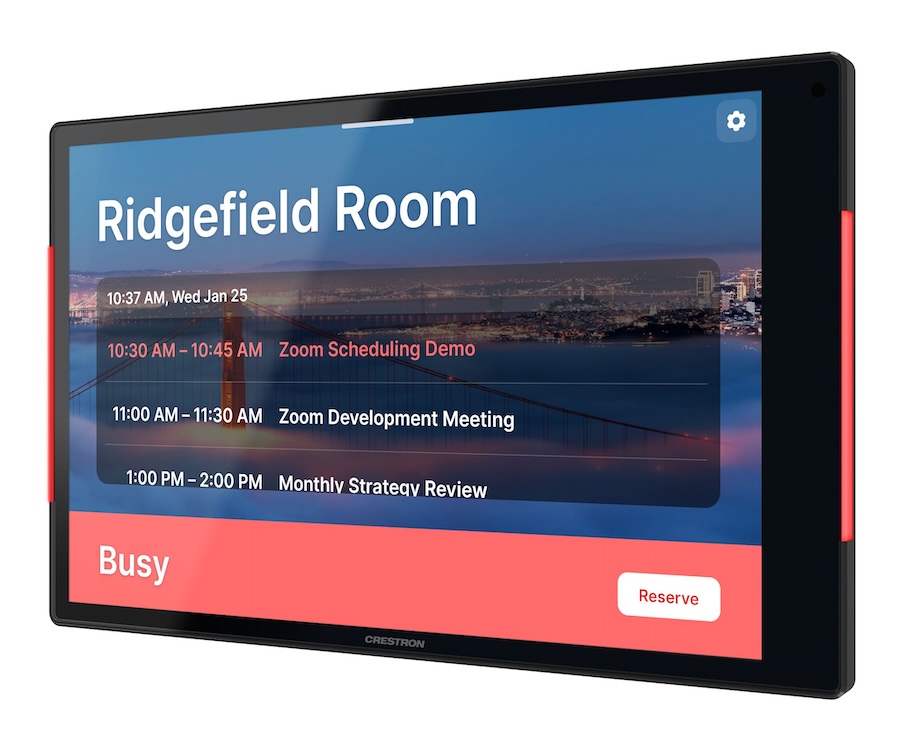
The first goal of any scheduling system is to eliminate the peek-through-the-glass habit. The 80 Series features integrated light bars that provide a clear visual status of the room before you even reach the door.
Red: The room is occupied.
Green: The room is free. This immediate status check prevents meeting interruptions and lets your team identify available spaces from a distance. The high-resolution display also shows the day’s agenda, so your staff can confirm they are in the right place without ever touching a door handle or peering through a window.
2. Effortless On-the-Spot Booking
Work doesn’t always happen on a planned schedule. Sometimes you need a huddle space now. With the 80 Series, you can book, extend, or release a room with just a few taps directly on the panel.
If you use Microsoft Teams Rooms or Zoom Rooms, the 80 Series integrates natively with your existing calendar platform. Employee adoption will be quick since there is no new software for them to learn. Booking is simple from their desk or at the point of entry via the touch screen.
3. Data-Driven Real Estate Planning
One of the most powerful features of the 80 Series is what happens behind the scenes. These panels are a pillar of the Crestron digital workplace platform, providing valuable usage data that helps inform business decision-making:
- Are your 12-person boardrooms being used by only two people?
- Which rooms are consistently overbooked?
- Are ghost meetings skewing your occupancy numbers?
Strategic resource planning allows you to reallocate space based on actual workforce behavior. By gathering intelligence on the how and when of space usage, you can make informed decisions about right-sizing your real estate and renovating existing spaces.
4. Enterprise-Grade Security and Deployment
For organizations without massive IT teams, easy deployment is a labor-cost necessity. The 80 Series requires only a single PoE-powered cable for both power and data, and the M3 team assesses your network to ensure it’s secure. Each panel is built on the MDEP (Mobile Device Endpoint Platform) and features enterprise-grade security, including 802.1X authentication and TLS encryption. You can scale these across an entire multi-site campus, from Memphis to Huntsville to The Woodlands, and manage them all through the XiO Cloud platform.
5. Wayfinding and Desk Scheduling
The intelligence of the 80 Series extends beyond the four walls of a conference room. M3 can integrate these panels into your broader wayfinding strategy, helping guests and new hires navigate complex facilities with ease.
Crestron’s desk scheduling products can transform open-office areas into fully schedulable workstations, assuring your hybrid employees that they’ll have a place to work before they even leave their house.
M3 Offers Businesses a Unified Workspace
We’ve previously discussed how Collab Compute handles processing, and M3 VISION provides monitoring. The 80 Series touch screen is the final piece of that puzzle—the interface that brings it all together for your team.
When your technology anticipates your needs, your team can stop worrying about where to meet and start focusing on what to accomplish.
Ready to reclaim your facility’s wasted time? Request a meeting room consultation today!


