
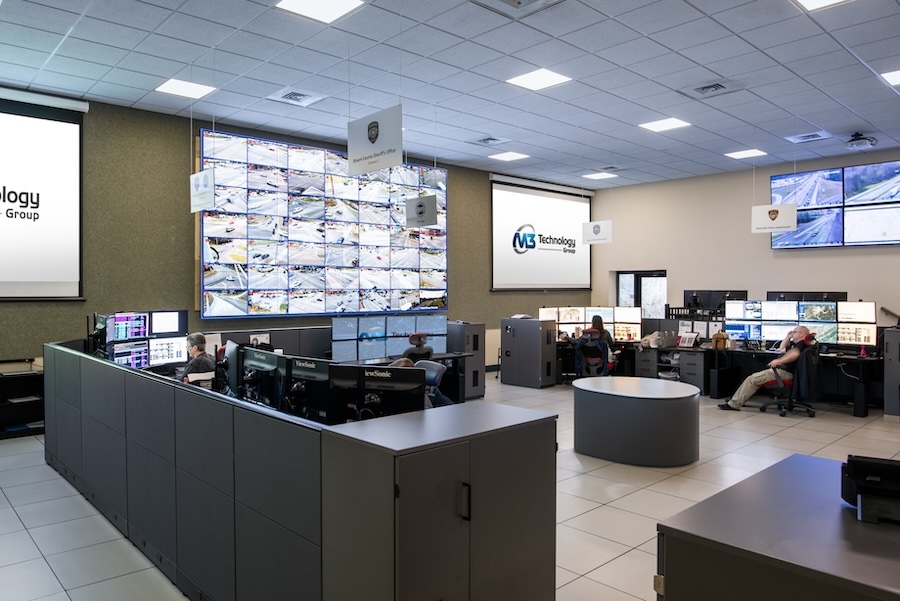
Video Walls for Control Rooms and Lobbies
Where a Video Wall Pays Off, and Where One Screen is Enough
A stuck feed on a 24/7 operations center wall is a bigger problem than a dead pixel in the lobby, but both get blamed on the same decision: installing a video wall in the wrong room, or skipping one where it would change how a team works.
Commercial buildings invest heavily in display space for areas that need a single good screen, while control rooms and security desks that could use a shared, wall-sized view are left with a bank of separate monitors nobody can read at a glance. The difference between a video wall that earns its budget and one that just looks impressive comes down to what the room needs to do day-to-day, well beyond how it looks in photos during a client walkthrough.
Keep reading to learn how M3 Technology Group sorts one from the other.
SEE ALSO: M3 VISION Gives Teams the Tools to Stay Ahead
Where a Video Wall Earns Its Keep
Lobbies and reception areas are the straightforward case. One branded video wall handles wayfinding, event schedules, and visitor messaging that would otherwise require a rack of separate screens and someone updating each one by hand.
The stronger case is the room designed around constant monitoring: a network operations center, a security desk, or a live event control room where several video and data feeds converge into one shared field of view. A campus security desk that once needed six monitors to track building entrances, parking lots, and the loading dock can run it all from one wall, with the operator catching changes at a glance without scanning six separate screens.
Pixel Flex LED tiles paired with Barco processing give that wall the resolution and uptime a control room depends on, so the team watching it isn’t piecing together a mismatched grid of separate monitors.
The Conference Room That Just Needed One Good Display
Not every room that asks for a video wall needs one. A mid-size conference room with a single presenter and a handful of remote participants gets the same result from one well-placed 4K display as it would from a wall built out of a dozen tiles, minus the mounting structure, the processing hardware, and the ongoing calibration that comes with a modular wall.
This is where a needs assessment earns its cost before a single panel gets ordered. Sizing the display to how the room gets used, rather than its square footage, keeps the budget pointed at rooms where a video wall changes how a team works: the lobby, the ops center, a training space running a dozen simultaneous feeds, or the conference room that only ever needed better cabling and one good screen.
Keeping a Video Wall Running for the Long-Term
A video wall is only as good as its uptime, and ongoing management matters as much as the install itself. Content scheduling and catching a failing LED module are part of daily maintenance, spread across the life of the wall.
M3 VISION gives facilities and IT teams a way to monitor display health alongside the rest of a building’s AV systems, flagging a failing component before it shows up as a black square during a board presentation or a gap in a security feed. For a wall carrying meaningful monitoring responsibility, that kind of visibility is part of the investment.
Book Your Video Wall Consultation Now
A video wall is a meaningful line item, and the payoff depends on matching it to the room. If your building has a lobby that could use better wayfinding, an ops center running on mismatched monitors, or a conference room you’re not sure needs an upgrade at all, an M3 Technology Group walkthrough can tell you which rooms are worth the investment and which just need one good display.
Contact our team here to schedule your video wall and AV assessment.


